
In the modern landscape of Pakistan’s energy sector, Sui Northern Gas Pipelines Limited (SNGPL) and Sui Southern Gas Company (SSGC) have fully digitized their consumer services. With the government’s shift toward the RLNG (Regasified Liquefied Natural Gas) model for new domestic connections, tracking your application is vital to ensure you don’t miss “Demand Notice” deadlines or survey appointments. To Track Sui Gas Application Online follow the below instruction
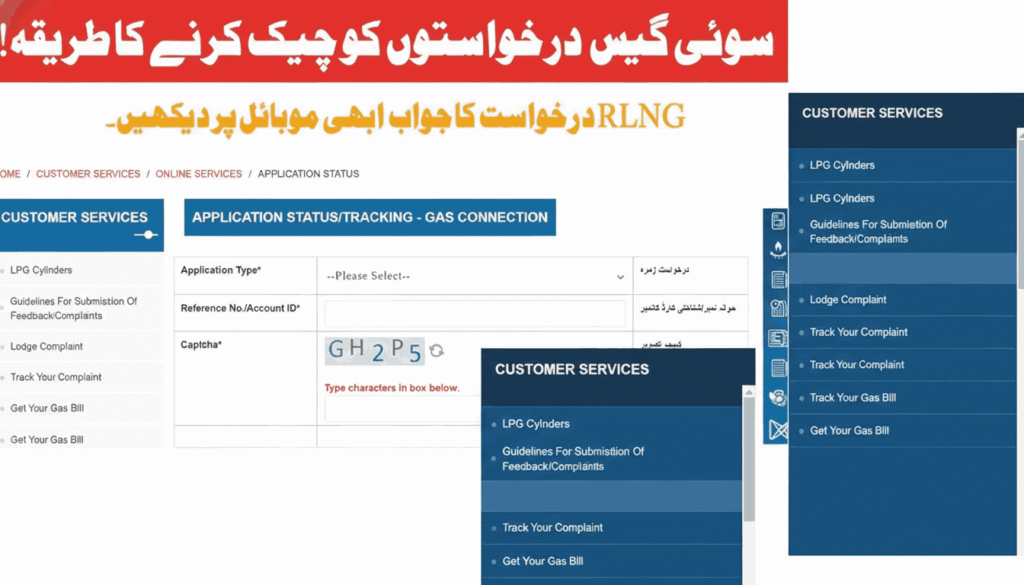
Identify Your Service Provider
Before you begin tracking, you must know which company manages your region:
- SNGPL: Serves Punjab, Khyber Pakhtunkhwa (KPK), and Islamabad.
- SSGC: Serves Sindh and Balochistan.
How to Check SNGPL Application Status (North)
SNGPL offers the most robust online tracking system. You can monitor your request using a Tracking ID (provided via SMS at the time of application) or your CNIC.
Method A: Via the Official Website
- Visit the SNGPL Official Portal.
- Navigate to the “Customer Services” tab and select “Status of New Connection.”
- Enter your 11-digit Tracking ID or your CNIC number (without dashes).
- Solve the Captcha and click “Submit.”
- The system will display your current stage (e.g., Survey Pending, Demand Notice Issued, or Meter Installation).
Method B: Via SMS (Fastest Way)
If you don’t have internet access, you can track your status via a simple text message:
- Type your Application Number and send it to 0921.
- You will receive an automated reply with the latest update on your file.
Method C: The “ConnectOn” App
Download the SNGPL ConnectOn app from the Google Play Store. Once you log in with your credentials, you can see a real-time dashboard of your application history.
How to Check SSGC Application Status (South)
For residents of Karachi, Quetta, and surrounding areas, SSGC provides tracking through its web portal and mobile application.
Method A: SSGC Customer Connect App
SSGC has prioritized its mobile app, SSGC Customer Connect, for 2026 services.
- Open the app and log in.
- Go to the “New Connection” section.
- Enter your Temporary Customer ID or Reference Number.
- The app will show if your application has cleared the initial scrutiny.
Method B: Online Web Portal
- Go to the SSGC Official Website.
- Look for the “Track Application” link under the New Connection menu.
- Input your Reference Number and registered Mobile Number.
Read More: https://cmportal.com.pk/sui-gas-online-application-apply/
Understanding Your Application Status Terms
When you check your status, you will encounter specific terms. Understanding them helps you know what to do next:
- Application Received: Your documents (CNIC, Property Registry) are being verified for authenticity.
- Survey Pending: A technical team will visit your site to check the distance from the nearest gas main line.
- Non-Feasible: This means there is no gas pipeline currently running in front of your house. In 2026, you may be offered an RLNG-specific extension plan.
- Demand Notice Issued: This is the most important stage. It means your application is approved. You must now download the “Challan” and pay the required security deposit at a designated bank.
- Work Order Issued: Your payment has been verified, and a team is scheduled to install the meter.
Estimated Costs for New Connections in 2026
The cost depends on the distance from the pipeline and the connection type.
- Standard Domestic RLNG Connection: Approx. PKR 21,500 to PKR 23,000.
- Service Line Charges: If the line is far, additional charges (approx. PKR 1,500+) may apply.
- Urgent Fee: Some regions allow an “Urgent Processing Fee” for faster installation, though this varies by policy.
Common Reasons for Delay or Rejection
If your status hasn’t changed for weeks, it might be due to:
- Incomplete Documents: Scanned copies of the Property Registry or Fard were blurry.
- Unpaid Dues: If the previous owner or tenant of your house left an unpaid bill, the new meter will not be installed until it is cleared.
- Illegal Locality: If your area has been declared “banned” by the local development authority (like LDA or CDA), the application will be rejected.
Helpline and Contact Support
If the online status check fails or shows an error, use these official contact points:
- SNGPL Helpline: Dial 1199 (Available 24/7).
- SSGC Helpline: Dial 1199.
- Email Support: customerservices@sngpl.com.pk or info@ssgc.com.pk.
Tracking your Sui Gas application online in 2026 is a matter of seconds if you have your CNIC or Tracking ID ready. Always ensure that once your status changes to “Demand Notice Issued,” you pay the fees immediately, as delays in payment can push your application back into the waiting list for several months.
Excellent site you’ve got here.. It’s hard to find excellent writing like
yours these days. I really appreciate people like you!
Take care!!
hello!,I like your writing so a lot! share we communicate extra approximately your post on AOL?
I require a specialist on this space to solve my
problem. Maybe that’s you! Taking a look ahead to peer you.