
Are you a resident of South Punjab looking for a way to check your electricity bill without waiting for the postman? You’ve come to the right place. Multan Electric Power Company (MEPCO) has modernized its billing system, allowing millions of consumers to access their electricity bills online.
In this article, we will guide about the process of MEPCO online bill check 2026, finding your 14-digit reference number, and downloading a duplicate copy in seconds.
Redirecting in 10 seconds
What is MEPCO? (Multan Electric Power Company)
MEPCO is one of the largest electricity distribution companies in Pakistan. It was incorporated in 1998 and is responsible for managing the electricity network in 13 districts of South Punjab.
The main goal of MEPCO is to ensure a stable power supply to both urban and rural areas. With over 34 million people relying on its services, MEPCO has introduced digital portals to make bill management easier for everyone.
MEPCO Service Areas
If you live in any of the following districts, you are a MEPCO consumer:
- Multan
- Bahawalpur
- Rahim Yar Khan
- Dera Ghazi Khan
- Muzaffargarh
- Layyah
- Vehari
- Khanewal
- Sahiwal
- Pakpattan
- Bahawalnagar
- Lodhran
- Rajanpur
Why Should You Check Your MEPCO Bill Online?
In 2026, digital convenience is no longer an option—it’s a necessity. Here is why you should use the MEPCO online portal:
- Instant Updates: See your bill as soon as it is generated by the WAPDA system.
- Avoid Late Surcharge: Sometimes physical bills are delivered late or lost. Online checking ensures you pay before the due date.
- PDF Download: You can save a digital copy on your phone or computer.
- Valid for Payment: A printed MEPCO duplicate bill is accepted at all banks, JazzCash, and Easypaisa shops.
How to Check MEPCO Online Bill Using 14-Digit Reference Number
The 14-digit reference number is the most important part of information for checking your bill. Follow these simple steps:
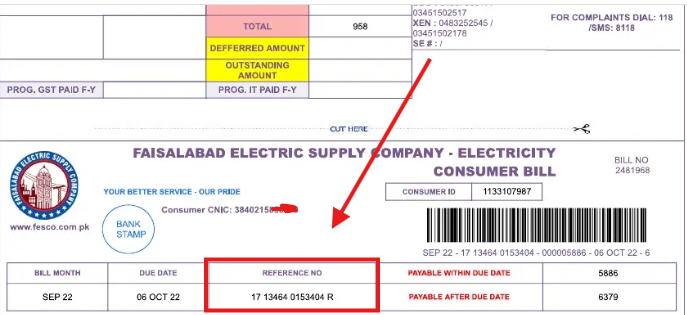
Step 1: Find Your Reference Number
Your reference number is a unique account ID assigned to your meter. To find it, look at any old bill. It is usually located at the top-left corner under the "Reference No" heading. It consists of 14 digits (e.g., 14 15111 1234567).
Step 2: Access the MEPCO Billing Portal
Open your mobile or desktop browser and go to the official MEPCO bill website or a reliable third-party duplicate bill portal.
Step 3: Enter the Details
In the input field, type your 14-digit reference number. Make sure there are no spaces or alphabets—just the numbers.
Step 4: View and Download
Click on the "Check Bill" or "View Bill" button. Your current month's bill details, including the total amount, due date, and units consumed, will appear. To get the full document, click on "View Full Bill" or "Download Duplicate Bill."
Understanding Your MEPCO Bill
Many people get confused by the different charges on their bills. Here is a simple table to help you understand:
| Billing Term | Meaning |
| Reference No | Your unique 14-digit account number. |
| Units Consumed | The total electricity (kWh) used in the current month. |
| FPA | Fuel Price Adjustment (changes monthly based on fuel costs). |
| QTR Surcharge | Quarterly Tariff Adjustment. |
| Late Payment Surcharge | The extra amount you pay if the bill is paid after the due date. |
| NJ Surcharge | Neelum Jhelum Surcharge. |
How to Pay MEPCO Bill Online in 2026
Once you have checked your bill online, you don't need to visit a bank. You can pay using:
- JazzCash/Easypaisa: Go to Bill Payment > Electricity > MEPCO > Enter Reference Number.
- Banking Apps: Almost every bank (HBL, Alfalah, UBL, etc.) supports MEPCO bill payments.
- TCS/Post Office: You can also take a printout to any authorized payment center.
MEPCO Bill SMS Service
MEPCO also offers an SMS service for those who don't have active internet all the time. To receive your bill information via SMS:
- Open your mobile SMS app.
- Type pitc <space> 14-digit reference number.
- Send it to 8334.
- You will receive your bill amount and due date via text message.
Tips to Save Electricity and Reduce MEPCO Bills
With rising electricity tariffs in 2026, saving energy is vital.
- Avoid Peak Hours: Try not to use heavy appliances (AC, Water Pump, Iron) between 6 PM to 10 PM.
- Check Your Meter: If you feel your bill is too high, check your meter reading against the bill. If there is a huge difference, contact the MEPCO office.
- Use Inverter Technology: Switch to inverter ACs and refrigerators to save up to 50% on energy.
MEPCO Helpline and Complaints
If you have issues like "Reference Number Not Found" or an incorrect bill amount, you can contact MEPCO:
- Helpline Number: 061-9220273
- Toll-Free: 0800-63726
- Official Website: www.mepco.com.pk
- Head Office Address: MEPCO HQ, Khanewal Road, Multan.
Checking your MEPCO online bill 2026 is a straightforward process that ensures you stay on top of your utility payments. By using the 14-digit reference number, you can access your bill anytime, anywhere. We recommend saving your reference number in your phone notes so you don't have to look for paper bills every month.