Managing your official identity documents used to involve long queues and endless paperwork at NADRA offices. However, with the Pak ID Mobile App, the Government of Pakistan has brought these services directly to your smartphone.
Whether you are living in Lahore or London, you can now modify your CNIC (Computerized National Identity Card) or NICOP (National Identity Card for Overseas Pakistanis) from the comfort of your couch.
Why Use the Pak-ID Mobile App?
The primary goal of the Pak-ID app is to provide convenience. In the past, even a small spelling mistake on a card required a full day’s visit to a NADRA center. Now, the app utilizes your phone’s hardware—like the camera and fingerprint scanner—to verify your identity.
Benefit of PAK ID App:
- No Physical Presence Required: Complete the entire process from home.
- 24/7 Access: Apply at any time, even on weekends or public holidays.
- Secure Biometrics: The app captures your fingerprints and face using high-resolution mobile cameras.
- Global Reach: Perfect for Overseas Pakistanis who cannot easily travel to a consulate.
Services Offered via the App
The Pak-ID Mobile App isn’t just for renewals; it handles a variety of modifications:
- Renewals: If your CNIC or NICOP has expired or is about to expire.
- Modifications: Changing your marital status, address, or permanent residence.
- Lost/Stolen Cards: Applying for a duplicate card if yours is missing.
- Conversions: Changing a manual ID card to a Chip-based Smart Card.
How to Modify Your ID Card
Getting started is simple, but it requires attention to detail. Follow these steps to ensure a smooth application:
1. Account Creation
First, download the Pak-ID app from the Google Play Store or Apple App Store. You will need to register an account using a valid email address and phone number. Once you receive an OTP (One-Time Password), your account will be activated.
2. Choosing the Category
After logging in, select the “Apply Now” option. You will be asked what you want to do. If you are updating information, select “Update.” Choose whether you are applying for a CNIC (for residents) or a NICOP (for those abroad).
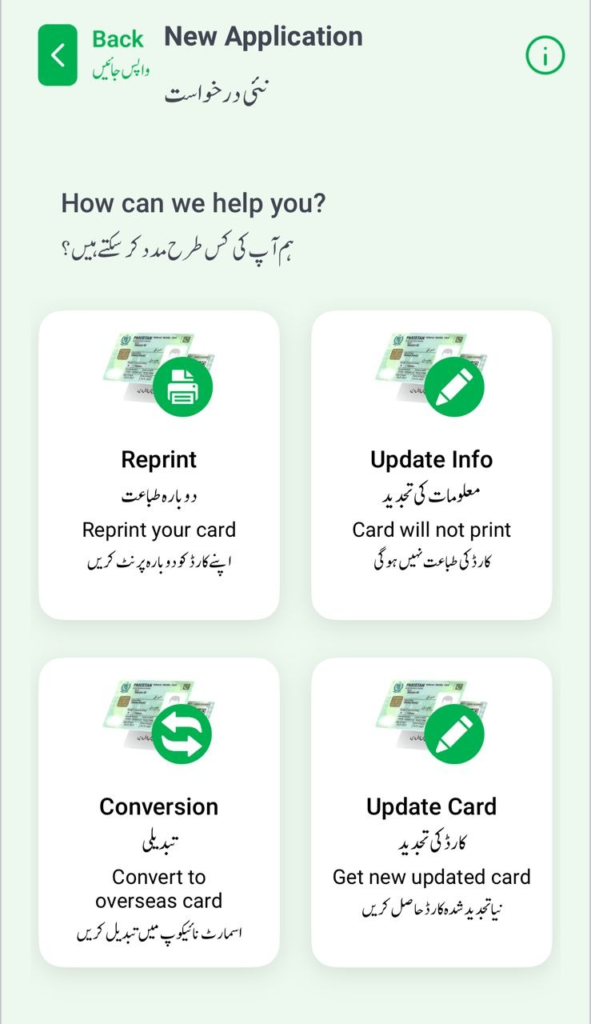
3. Data Entry
This is where you provide your details. You will need to enter your existing ID number and then type in the updated information.
Tip: Double-check every letter. Ensure that names and addresses match your supporting documents (like a marriage certificate or utility bill) exactly.
4. Fee Payment
The app accepts Credit or Debit cards (Visa/Mastercard). The fee depends on the “Priority” you choose:
- Normal: Cheaper, but takes about 31 days.
- Urgent: Faster processing, usually around 15 days.
- Executive: The quickest option, often processed within 7–10 days.
5. Biometric Verification
This is the most innovative part of the app. Instead of a physical ink pad, the app uses your phone’s camera to scan your fingerprints.
- Place your hand behind the camera as instructed.
- Ensure there is plenty of light.
- Keep your fingers steady.
6. Document Upload
You will need to take clear photos of your supporting do{P{Marriage Certificate.
Important Tips for a Successful Application
To avoid your application being “rejected” or “deferred,” keep these points in mind:
- Photography: When taking your “ID photo” via the app, stand against a plain white background. Ensure there are no shadows on your face and your eyes are clearly visible.
- Document Clarity: If the text on your uploaded documents is blurry, NADRA officers will reject the application. Use a “Scan” mode if your phone camera has one.
- Internet Stability: Make sure you have a strong Wi-Fi or 4G connection when uploading biometric data, as these files are large and sensitive.
Common Challenges and Solutions
| Problem | Solution |
| Fingerprints not scanning | Try cleaning your camera lens and moving to a brighter room. |
| Payment Failure | Ensure your bank has “International/Online Transactions” enabled on your card. |
| App Crashing | Clear the app cache or ensure you are using the latest version from the Store. |
The Future of Identity in Pakistan
The Pak-ID app is a significant step toward a Digital Pakistan. By moving identity management to a mobile platform, the government is reducing the burden on physical infrastructure and making life easier for citizens. It’s a “contactless” solution that saves time, fuel, and energy.
The Pak-ID Mobile App is a powerful tool that puts the authority of NADRA in your pocket. While the technology is advanced, the interface is designed for the average user. As long as you have your supporting documents ready and a decent smartphone camera, you can handle your national identity needs without ever stepping outside.